
Language learning Chrome extension
Learn languages from YouTube, Netflix, websites and PDFs.
NoaLingua puts dual subtitles on video, makes words clickable, explains grammar in context, turns PDFs into bilingual reading, adds shadowing and pronunciation practice, and brings saved vocabulary back with spaced repetition.
No account. No analytics. The free plan lets you try every feature.
What it does
One product loop: watch, read, speak, remember.
Watch with dual subtitles
Use original and translated subtitles on YouTube, Netflix and supported HTML5 video players. Replay, auto-pause and jump sentence by sentence.
Open pageClick any word
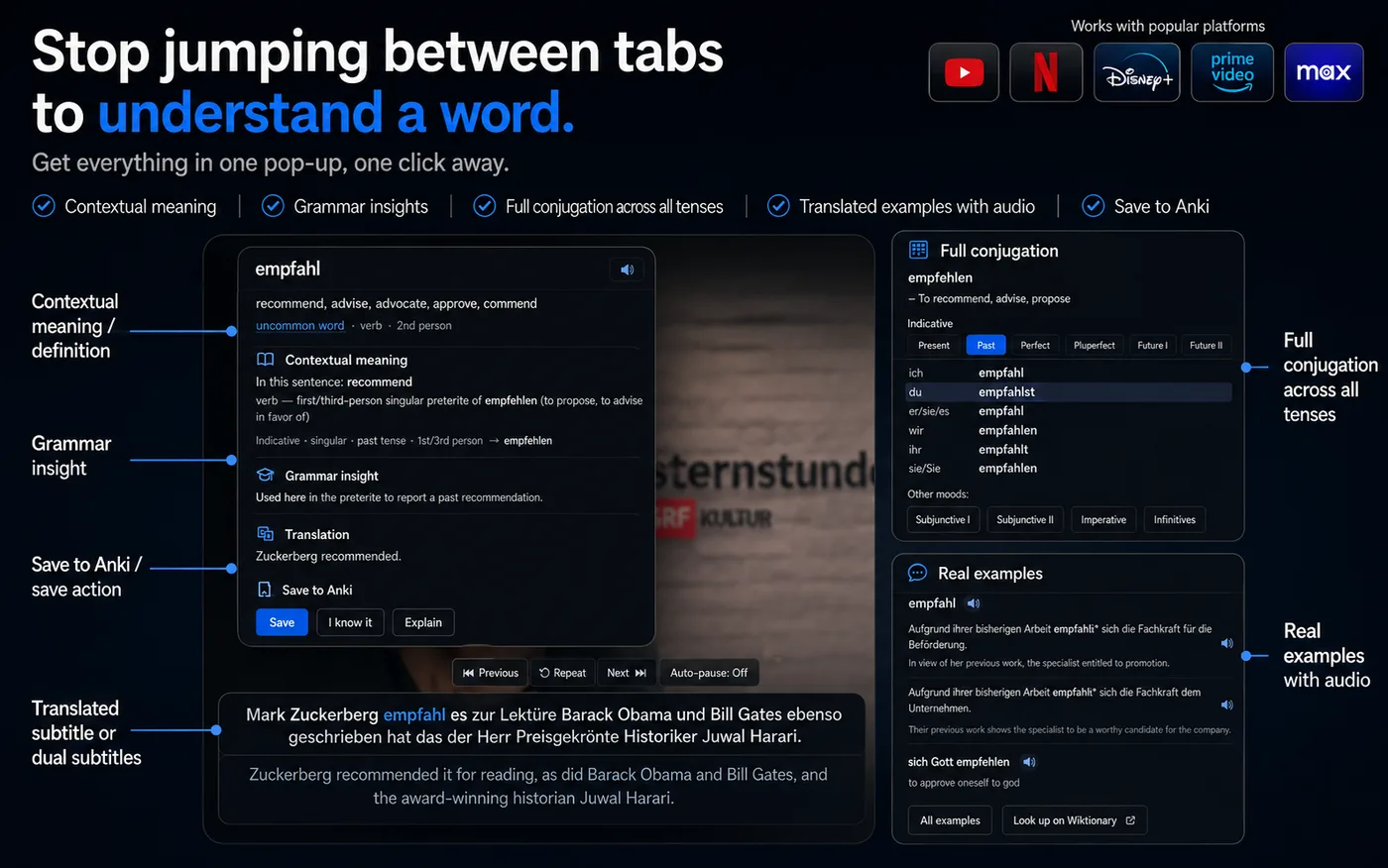
Open a word popup with the meaning in that sentence, part of speech, conjugation or declension data, IPA when available and real examples.
Open pageRead PDFs and websites
Translate selected text, Alt-click paragraphs, mark unknown words on a page, or open PDFs as a bilingual book or clickable original-layout viewer.
Open pagePractice shadowing
Pause after each line, repeat it aloud, use one-sentence shadowing, or use Say It Back when Chrome speech recognition is available.
Open pageReview what you saved
Saved words keep their original context and return through SRS, review games, manual review, and Anki-compatible exports.
Open pageKeep it private
No account and no analytics. Offline dictionaries, grammar data and examples stay in your browser profile once downloaded.
Open pageProduct proof
Real NoaLingua surfaces, not stock language-learning photos.
The pages below use the same app surfaces described in the product manual: subtitle overlay, word popup, transcript panel, PDF reader, shadowing and Learn.
Independent choices, clear trade-offs
Compare language-learning tools by the workflow you actually need.
We publish current, source-linked comparisons and clearly disclose that NoaSolutions makes NoaLingua. No fake ratings, affiliate rankings or invented weaknesses.
Language Reactor alternatives
Seven free and paid options compared by video coverage, reading, review, speaking and privacy.
Open pageNoaLingua vs Language Reactor
A direct comparison of dual subtitles, saving, PDFs, accounts, pricing and what happens after lookup.
Open pageBest Chrome extensions
Seven language-learning extensions for video, web reading, PDFs, sentence mining and retention.
Open pageBest tools for learning with YouTube
Choose the right tool for captions, transcripts, pronunciation, shadowing or sentence mining.
Open pageOffline setup
The app keeps preparing itself after setup.
Downloads are part of the product
NoaLingua downloads word dictionaries, grammar data, Wiktionary/Kaikki packs, example sentences and a punctuation model in the background. The Downloads screen exists so users can see exactly what is done, what is missing and retry stalled work.
Closing the page is not supposed to lose progress
The manual describes persistent download state, automatic retries and a service worker alarm that wakes the extension while something is missing. The website now explains that offline setup is normal instead of hiding it.
Pricing
Try every feature for free.
The free plan includes every surface and every learning mode. The paid plans remove the saved-word limit. Payments are handled by Paddle as merchant of record; NoaLingua never receives card details.
Refunds
Fourteen days, no questions asked.
If NoaLingua is not what you expected, email support@noasolutions.org within 14 days of purchase and we will refund you in full. Refunds are issued by Paddle to the original payment method.
Terms
NoaLingua reads what your browser can already show you.
NoaLingua does not provide video content, bypass DRM, bypass geographic restrictions or add captions where a site provides none. It reads subtitles, selected text and documents you deliberately open with the extension.
Privacy
No account, no analytics, no learning profile on our server.
Your saved words, review history, translation cache and downloaded packs live in your browser profile. The paid-license restore flow is the one place an email address can be sent to a NoaSolutions service, and only when you type it and press restore.
Contact
Support, refunds and privacy requests.
support@noasolutions.org. NoaLingua is built by NoaSolutions.
Try NoaLingua free
Install the Chrome extension and test it on a video, a PDF or a web page.