
YouTube transcript export
Turn a YouTube transcript into a bilingual PDF
Fetch the full caption transcript, translate it sentence by sentence and download parallel study material instead of copying subtitle fragments by hand.
No account. No analytics. The free plan lets you try every feature.
Quick answer
Turn a YouTube transcript into a bilingual PDF
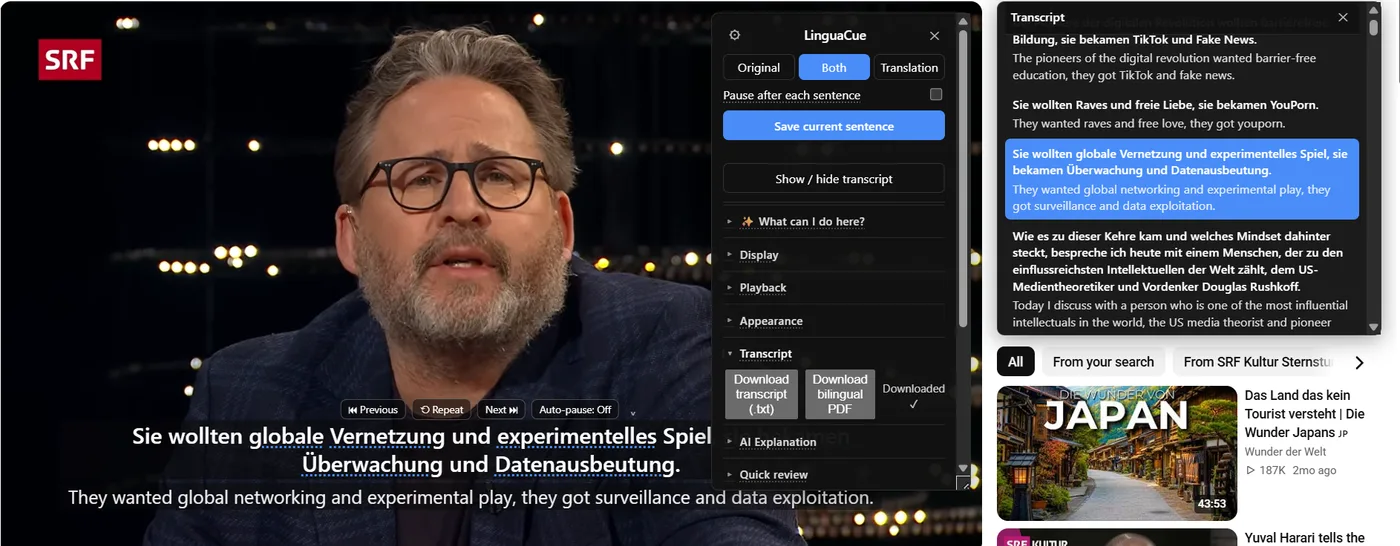
On supported YouTube videos, NoaLingua fetches the available transcript, rebuilds caption blocks into sentences and can export original and translated lines as a bilingual PDF. The export reports how many lines actually translated instead of silently leaving gaps.
How it works
How to export the transcript
- Open a YouTube video with captions and turn captions on.
- Open the NoaLingua quick menu and show the transcript panel.
- Choose Download bilingual PDF.
- Keep the tab open while translation and PDF building progress are shown.
How it works
Why sentence rebuilding matters
YouTube captions often arrive as timing blocks rather than clean sentences. NoaLingua combines those blocks before translation and navigation, so the PDF reads more like study text and less like a raw subtitle dump.
How it works
What the export includes
The transcript export can include the video title, URL, timestamps, original sentences and translations. Previously viewed lines may already be in the local cache. A plain .txt transcript is also available when translation is not needed.
How it works
Limits you should expect
The video must expose captions or a transcript the extension can read. Machine translation can fail, a daily cloud quota can end, and local Chrome models do not exist for every language pair. The finished message states the translated count so you know whether the PDF is complete.
Questions answered
Frequently asked questions
Can NoaLingua export any YouTube video?
It needs an available transcript or captions it can fetch. A video with no usable captions is not guaranteed to produce a full transcript export.
Can it export Netflix subtitles to PDF?
Not as a full-film bilingual PDF. Netflix does not expose the complete subtitle file to the extension, so NoaLingua only builds from lines seen on screen.
Is the PDF automatically perfect?
No. Caption accuracy and machine translation still matter. NoaLingua reports incomplete coverage rather than presenting every export as fully translated.
Continue
Use the feature in a real learning loop
Explore every feature
See video, reading, speaking and review workflows.
Open pageCompare your options
Current, source-linked comparisons with clear trade-offs.
Open pageRead practical guides
YouTube, PDFs, shadowing and vocabulary workflows.
Open pageTry NoaLingua free
Install the Chrome extension and test it on a video, a PDF or a web page.